
Highway Progress Management
Overview
The Highway Strip Chart Extension, built entirely inside Zoho Creator, transforms complex highway construction data from static spreadsheets and tabular reports into an interactive, colour-coded visual strip chart. Highway construction projects generate large volumes of progress data every day across activities such as excavation, GSB, WMM, DBM, BC, and drainage work. Instead of maintaining scattered rows and columns that become harder to read as project length grows, project teams can view planned and actual construction progress clearly along every highway chainage in one centralized platform.
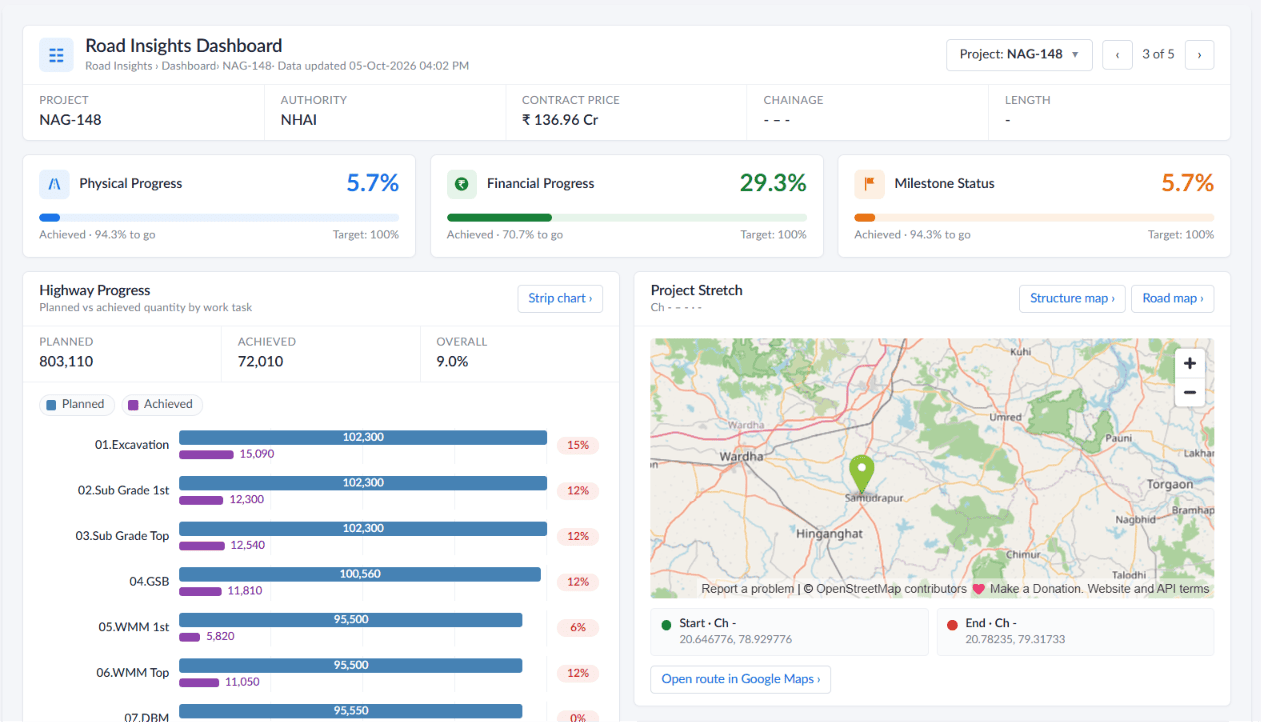
1. The Challenge with Traditional Progress Reporting
Managing highway construction progress through conventional Excel tables presents major operational bottlenecks as project corridors expand. Large tables are difficult to interpret quickly, especially when multiple construction activities—such as earthwork, sub-base, base course, DBM, BC, and drainage—are spread across hundreds of chainage intervals. Preparing visual progress summaries from raw spreadsheets requires significant additional manual effort, while project review meetings demand clear, easy-to-understand visuals. Although the underlying project data is available, sharing construction progress with stakeholders in a meaningful, actionable format remains time-consuming and prone to delays.
2. What is the Highway Strip Chart Extension?
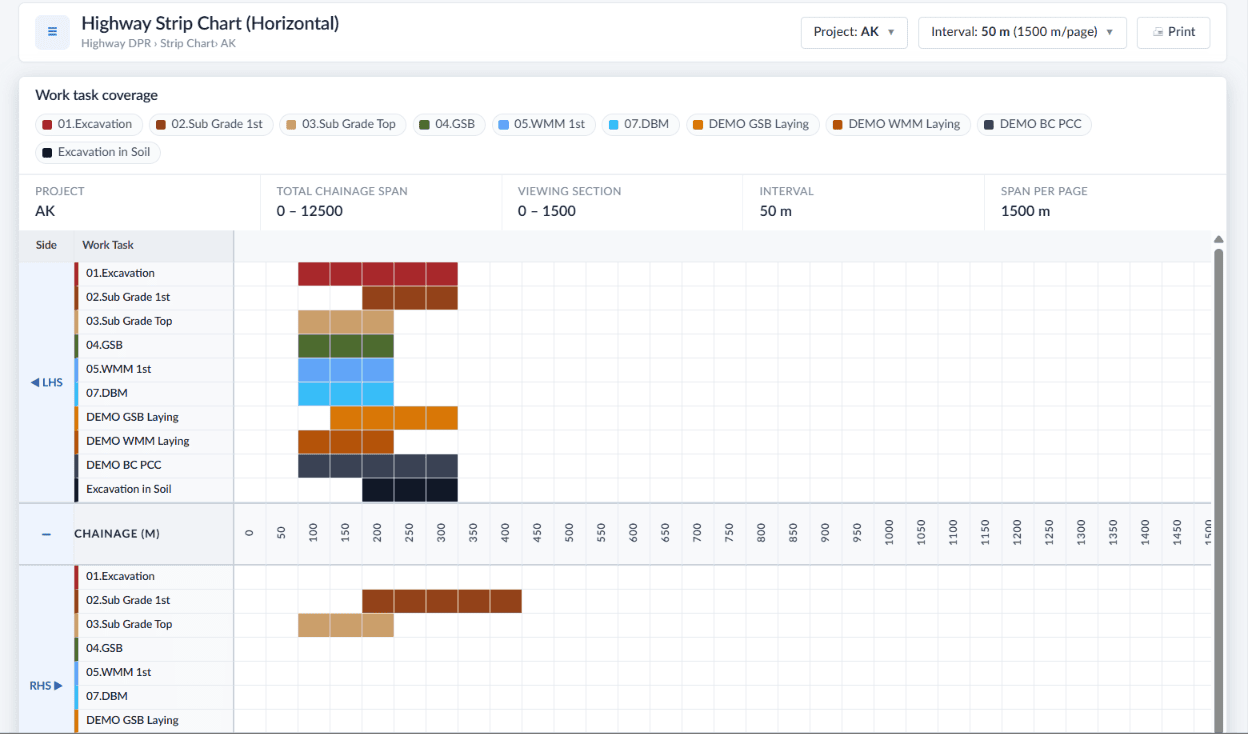
The Highway Strip Chart is a dedicated Zoho Creator extension that converts table-based highway construction data directly into a structured, visual strip chart. Rather than scanning dense rows and columns to verify status, engineers and project managers can inspect construction progress in a clean, colour-coded layout that maps each activity across exact highway chainages (such as 0+000 to 10+000 and beyond, across both LHS and RHS alignments). Built natively inside Zoho Creator, it connects seamlessly with existing project forms, daily progress logs, and reporting workflows without requiring external third-party charting tools.
3. Convert Table-Based Highway Data into a Visual Strip Chart
Highway progress records captured in structured Zoho Creator tables—covering activities like excavation, sub-grade top, GSB, WMM, DBM, BM, BC, DLC, PQC, RCC drain, and toewall—are automatically translated into a visual strip chart view. Users can select a specific project, filter by From Chainage and To Chainage, or configure chainage intervals (such as 50m or 1000m segments) and regenerate the chart on demand. This automated conversion eliminates manual spreadsheet formatting and turns raw daily site logs into immediate chainage-wise visual intelligence.
4. Display Planned and Actual Work Progress Together
Effective highway monitoring requires comparing scheduled targets against ground execution at every stretch of the road. The Highway Strip Chart displays both planned and actual work progress side by side within the same visual view, along with live chainage-level summary metrics such as total project length, completed kilometers, in-progress stretches, planned sections, and stretches not yet started or on hold. This dual visibility helps project teams spot bottlenecks early, track layer-by-layer dependencies from soil foundation to surface course, and keep execution aligned with project milestones.
5. Colour-Coded Sections for Quick Identification
Each construction activity and progress stage is represented through distinct, intuitive colour-coded blocks across every chainage interval. Whether distinguishing between completed stretches, work in progress, planned segments, not-started sections, or stretches on hold—or differentiating structural road layers at a glance—colour coding removes the need to read through individual text cells. Project engineers and senior management can immediately identify completed corridors, pending gaps, and active work fronts within seconds.
6. Adaptable Layout for Projects of Different Lengths
Highway infrastructure projects vary widely in scale, from short municipal road upgrades to multi-kilometer national highway corridors. The Highway Strip Chart features an adaptable layout designed to handle projects of any length smoothly. Users can adjust chainage ranges and interval granularity dynamically, ensuring that both macro-level corridor overviews and micro-level chainage inspections remain clean, readable, and well-proportioned regardless of total route distance.
7. Generate Printable Strip Charts for Project Reporting
Formal documentation and offline reviews are essential parts of highway contract administration and client reporting. With one-click PDF export and print capabilities, teams can generate standardized, printable strip charts directly from Zoho Creator. These clean, presentation-ready reports can be shared immediately during site review meetings, submitted to stakeholders and authorities, or archived for project audits without extra graphic design or formatting work.
8. Key Operational Benefits for Project Teams
By bringing automated strip chart visualization directly into Zoho Creator, the Highway Strip Chart Extension delivers measurable improvements across daily reporting and executive reviews. Teams significantly improve the readability of highway progress reports, eliminate repetitive manual effort in building visual charts, and present project status far more effectively during review meetings. Standardized, professional reporting formats ensure consistency across all projects while saving valuable engineering hours and improving overall reporting accuracy.
Conclusion
The Highway Strip Chart Extension transforms complex highway construction data into an easy-to-understand visual report. By converting tabular data into a professional, colour-coded strip chart, it simplifies progress reporting, enhances communication across site and management teams, and helps organizations present project status with greater clarity—all within Zoho Creator. If your infrastructure or construction team is still spending hours manually formatting spreadsheets for review meetings, Traqmetrix Solutions can help you implement a tailored Zoho Creator solution built around your exact project workflows. Ready to turn your highway data into clear visual progress?